AWS Cloud Infrastructure & Security Lab
I built a small AWS web environment, kept its servers private, and checked that requests reached healthy servers across two locations.
Completed guided workshop
- Technologies
- AWS VPC, EC2, IAM, Systems Manager, S3, ALB, Auto Scaling, CloudWatch
Explore the full project on GitHub ↗Setup notes, lab journal, and original evidence.
My first AWS project
At Rider University's AWS 101 workshop, I set up the cloud infrastructure for a supplied web application and completed the optional scaling challenge. This was a guided exercise in a temporary account, completed in October 2026.
What I did
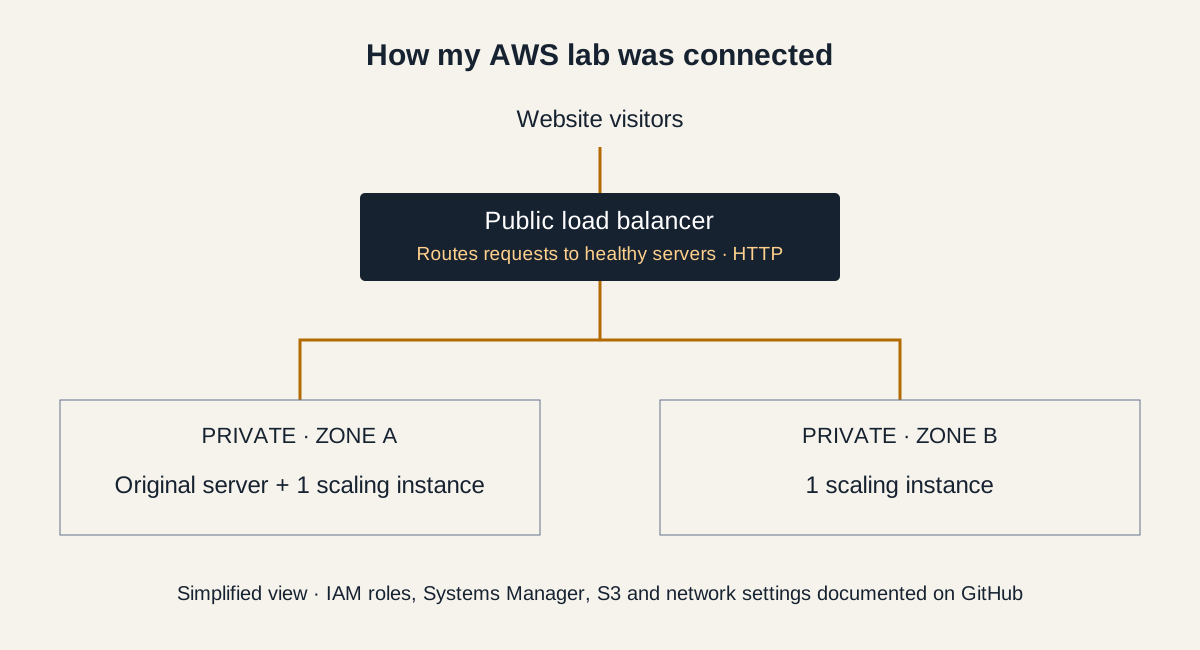
- Kept the servers private: I separated the public entry point from the servers running the app.
- Managed access: I used AWS roles and Systems Manager to administer the server without public SSH access.
- Added capacity: I configured two additional servers across two AWS Availability Zones.
- Checked and cleaned up: I confirmed all three servers were healthy behind the load balancer, then removed the temporary infrastructure.
What I verified
3 healthy servers · 2 Availability Zones · 2 servers managed by Auto Scaling
The application loaded through the load balancer. I configured automatic scaling, but did not test it under heavy traffic.
What I learned
I practiced controlling access, checking system health, and removing resources after testing—useful foundations for cloud security work. I also found that the app's S3 file list used sample data, so I did not count it as proof of a real storage connection.
The lab used HTTP. Next, I would add HTTPS, review permissions, and test scaling. GitHub has the full settings, evidence, cleanup notes, and test limitations.
Read the full documentation on GitHub ↗Follow the documented steps, findings, and current limitations.